
Simple SDR programs for Linux using GNU Radio Companion
Simple SDR programs for Linux using GNU Radio Companion
Due to the imminent loss of support for Microsoft Windows 10 many operators are looking at Linux as an alternative operating system to use with Cross Country Wireless SDR receivers.
Although the receivers have been out of production for several years we still try to support them especially as we still use some ourselves for production testing with our active antennas.
We have recently developed a simple SDR program for Linux using GNU Radio and the GNU Radio Companion for use with the Sentinel 4 , SDR-4+ , Sentinel 2 and SoftRock receivers.
A SDR receiver program designed for USB, LSB and data use. It has five selectable filters 2700 Hz for SSB and FT-8, 1800 Hz for SSB contest or DX, 100 Hz centered on 600 Hz for CW, 250 Hz wide centered on 1500 Hz for use with WSPR and 300 Hz for RTTY. DOWNLOAD HERE: Cross Country Wireless SSB receiver
GNU Radio is a free software development toolkit available in Linux that provides signal processing blocks to implement software-defined radios and signal-processing systems. It can be used with external RF hardware to create software-defined radios, or without hardware in a simulation-like environment. It is widely used in hobbyist, academic, and commercial environments to support both wireless communications research and real-world radio systems.
The GNU Radio Companion is a graphical UI used to develop GNU Radio applications. This is the front-end to the GNU Radio libraries for signal processing. The sample program file below open and run in GNU Radio Companion. The program file can be inspected and changed to suit the users requirements.
We have used the latest Ubuntu LTS version and the latest version of GNU Radio Companion to prepare the program.
If you have never used GNU Radio or GNU Radio Companion before download GNU Radio Companion from the App Centre in Ubuntu.
Connect the SDR-4++ receiver to the Linux PC.
In Settings, Sound make sure that the sound card in the SDR-4+ is selected as both input and output device.
Click on the program file. GNU Radio Companion should automatically open .grc files.
A flowchart describing the operation of the program will be displayed.
On the top line select Run then Execute to start the program.
If all is well you should see the program open at the default frequency of the receiver (typically 7.050 MHz).
To change frequency we use the Hamlib CAT control system in WSJT-X or FlDigi to control the receiver frequency.
In WSJT-X or FlDigi select the stereo audio monitor for the SDR sound card sound card as your audio input to WSJT-X or FlDigi. For the SDR-4+ and SoftRock receivers select "SoftRock Si570 AVR-USB" for CAT frequency control, for the Sentinel 2 select "Kenwood TS-570D" at 9600 bd and for the Sentinel 4 select "Kenwood TS-2000" at 19200 bd.
You should now have a fully working system.
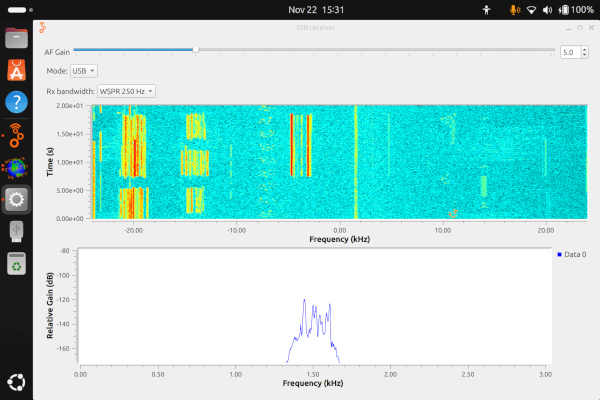
The first image shows the program working with a SDR-4++ receiver on the 20m amateur band.
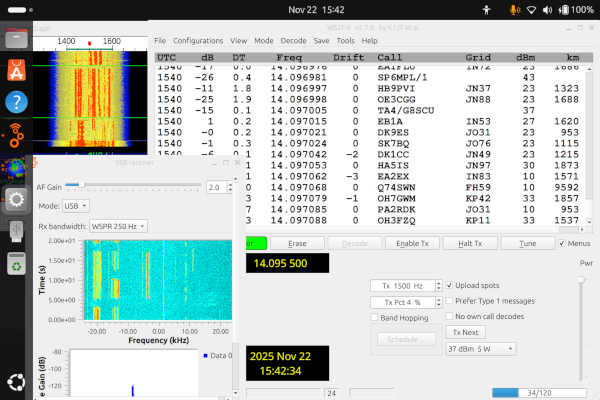
The second screen shot shows a SDR-4++ receiver working with WSJT-X receiving WSPR. The antenna is a 2.5 m vertical using a High Z Antenna Amplifier.
Note...All the files have been written and tested using the Ubuntu 24.04.2 LTS version of Linux. They may not work with earlier versions.
Special thanks must go to Ross Wilkinson, G6GVI who gave an interesting talk on GNU Radio Companion at the Bolton Wireless Club some years back that opened up the possibilities to all who were there.
If you require more detailed information please contact us by email at info@crosscountrywireless.net